Pages

Showing posts with label SAP. Show all posts

Monday, February 15, 2010

Posting Period Variant

To set open periods in a fiscal year we need to first define a posting period variant. Then we need to assign the same to a company code.

Define Posting Period Variant

Financial Accounting (New) > Financial Accounting Global Settings (New) > Ledgers > Fiscal Year and Posting Periods > Posting Periods > Define Variants for Open Posting Periods (OBBO)

Give a four digit code as variant name.


Financial Accounting (New) > Financial Accounting Global Settings (New) > Ledgers > Fiscal Year and Posting Periods > Posting Periods > Assign Variants to company code (OBBP)


we can assign posting period here or maintain in the global parameters for the company code. We have created Posting Period Variant and assigned it to the company code. Now we can maintain the open periods for the company code.

Financial Accounting (New) > Financial Accounting Global Settings (New) > Ledgers > Fiscal Year and Posting Periods > Posting Periods >  (OB52)


Now , In the above screen

Column 1 :- Posting Period for which we would like to maintain open periods
Column 2 :- Account Type for Masking
                   + For all account types
                   A For all Asset
                   D For Customers
                   K For Vendors
                   S  For GL Accounts

Column 3 & 4 :- From Account and To Account determines the range of accounts for the given Account type.

Column 5 & 6     :  starting period and year for the open period range.
Column 7 & 8     :  ending period and year for the open period range.
Column 9 & 10   :  starting period and year for the special period.
Column 11 & 12 :  ending period and year for the special period.

Column 13 : Authorization Group - we can maintain authorization group in case we need  the posting period to be available to restricted group of users only.


Sunday, February 14, 2010

Fiscal Year and Posting Period Variants

Fiscal Year Variant


Financial Accounting (New) > Ledgers >Fiscal Year and Posting Periods >Maintain Fiscal Year Variant (OB29)


Fiscal Year variant contains the characteristics of the Financial Year for Accounting. This contains
a)      no. of posting periods in the Fiscal Year
b)      no. of special period at the end of Fiscal Year
c)       Weather the fiscal year follows a calendar year (Jan-Dec) or some other (Apr-Mar etc.)
d)      In case the posting period should be separately for each year.

Ex 1. Jan-Dec with 4 special period


In the above example, we have created N9 Fiscal year variant ;
a)      With 12 posting periods  and
b)       4 special periods for closing operations
c)       This variant follows Calendar year ie. 1st period will by Jan, 2nd Feb etc.
d)      Finally posting periods will not change year on year i.e. 1st period of each financial year will be Jan and 12th period will always be December.

 Ex 2. Apr-Mar 4 special periods (ex- year 2010-11)


In the above example, we have created A9 Fiscal year variant ;
e)       With 12 posting periods  and
f)         4 special periods for closing operations
g)       In this example Calendar year check box is not checked. So, this variant does not follows Calendar year ie. 1st period will not be by Jan or 12th period as Dec etc.

In this case we need to maintain periods i.e. which calendar month will be first  month of the Financial year. In this example the first month is Apr. So the periods will be maintained as shown below


In the Periods section,
a.      first column Month represents the calendar month i.e. 1 represents Jan, 2- Feb and so on.
b.      Second column Day represents no. of days in the month
c.       Third column Periods represent the month in the financial year. Now this is important, here 1st period in the financial year is April so we have maintained 1 representing the first period of financial year against 4th period in column Month. Similarly Month 5 – period 2, Month 6 – period 3 and so on, finally Month 3(March) will be the 12th period.
d.      In this example the financial year comes in two calendar years. For example Apr 2010 to March 2011, in this case 1st period to 9th period will fall in 2010 and 10th to 12th periods in 2011.

Now the 1st month represents 10th period of the financial year, to make sap understand that 10th period represents financial year started in 2010 we need to maintain year shift.

For current year we maintain 0 and for the months falling in next calendar year as -1.

h)      posting periods will not change year on year i.e. 1st period of each financial year will be Jan and 12th period will always be December.


Period Text
Here we can maintain the text for the periods as shown below.


Shortened Fiscal Year and Posting Period Variant will be discussed in next blog...

Sunday, February 7, 2010

Chart of Accounts and Account Group

Define Chart of Account

Finance Accounting (New) > General Ledger Accounting (New) > Master Data > G/L Accounts > Preparations > Edit Chart of Accounts List (OB13)


A Chart of Accounts is list of GL Accounts. A Chart of Accounts  can be assigned to Company Code as ;

a) Operation Chart of Account (Mandatory)
b) Group Chart of Account (Optional)
c) Country specific Chart of Accounts

CoA Name can be a 4 alphanumeric characters.

Table :T004


Assign Chart of Accounts to Company Code

We assign Chart of Accounts to Company Code while maintaining the "Global Parameters"(OBY6) for the company code. An Operational CoA and Country Specific CoA is assigned to company code in OBY6, while Group Chart of Account is Assigned to operational Chart of Account inn OB13.

Unless we maintain CoA and FYV in Global Parameters, we will not be able to assign company code to a controlling area.


Change a Chart of Account

Once CoA is assigned to Company Code and Controlling Area, we will not be able to change or delete CoA assignment without resetting company code. We can reset company code by deleting data in company code using transaction OBR1 or OBR2.

After Data is deleted using above transaction first change assignment in Company Code's Global Parameters OBY6 and then Maintain Controlling Area OX06.


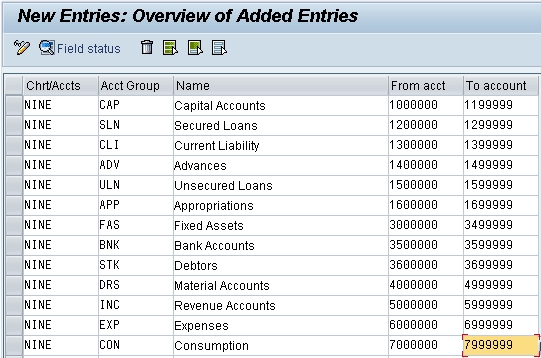
Create Account Groups

Finance Accounting (New) > General Ledger Accounting (New) > Master Data > G/L Accounts > Preparations >  Define Account Groups (OBD4)


Account Groups is grouping of GL accounts based on certain criteria or similarity in nature of Account.

An Account Group is are used to organize or manage the GL Accounts.

It controls the Number Range in which the Account must be created. Also, it controls Field Status and screen layouts for company code specific area.

Account Groups are created with reference to CoA.